Twitch Dashboard Mockup Generator
Real numbers, your narrative.
Design a pixel-perfect Twitch creator dashboard for partner-milestone content, esports case studies, and streaming agency pitches. Customize subs, bits, followers, and revenue. Free to use and offline.


Pixel-Perfect Twitch Creator UI
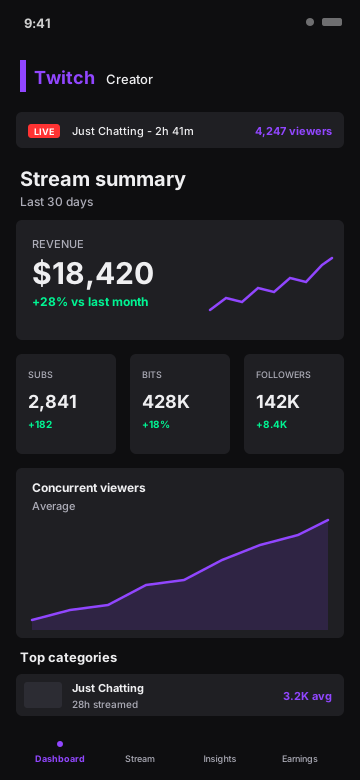
Twitch dark UI with the brand purple (#9146FF), the iconic vertical accent bar, live banner with category and concurrent viewer count, revenue hero card, subs/bits/followers tile row, concurrent viewers area chart, and the top categories list.
- Twitch dark + signature purple
- Live status banner with category
- Revenue hero card with sparkline
- Subs / Bits / Followers tile row
- Concurrent viewers area chart
- Top categories with stream hours
Every Twitch Metric, Editable
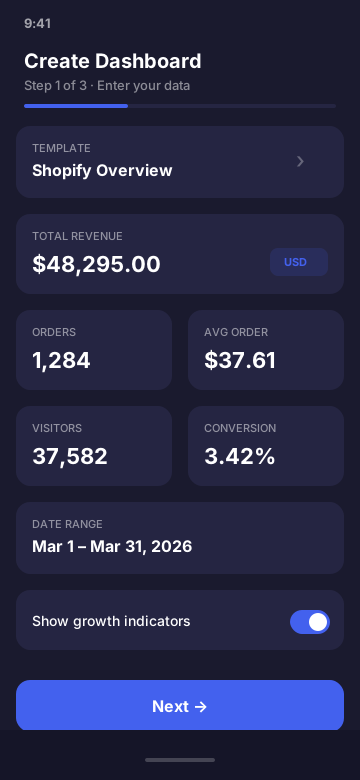
Set subscribers, bits, followers, monthly revenue, average concurrent viewers, live category and viewer count, and top streamed categories. Presets cover everything from a Twitch Affiliate hitting their first 50 subs to a Partner pulling 10K avg viewers.
Built for Streamers and Esports Orgs
Use it in partner-milestone reveal content, esports org case studies, streaming agency pitches, and stream coaching demos. No need to expose real revenue, bit data, or subscriber pricing.
- Partner milestone reveal videos
- Esports org case studies
- Streaming agency client pitches
- Stream coaching demos
- "How I made Partner" content
Twitch Dashboard Mockup FAQ
What does the Twitch dashboard mockup look like?
It mirrors the Twitch creator dashboard: dark UI with the iconic Twitch purple (#9146FF), live status banner with category and concurrent viewer count, revenue hero card with sparkline, subs/bits/followers tile row, concurrent viewers area chart, and top categories list.
What Twitch fields can I customize?
Subscribers, bits earned, follower count, monthly revenue, average concurrent viewers, live category and viewer count, top categories with stream hours, and live stream duration.
Who uses Twitch creator mockups?
Twitch streamers showing partner-milestone content, esports orgs in case studies, streaming agencies in client pitches, and stream coaches teaching audience growth. Mockups let you show numbers without exposing real subscription pricing or affiliate data.
Is it legal to mock up Twitch?
Yes. The output is labeled simulated and the app is not affiliated with Twitch or Amazon. Use it for design, content, and education - not to misrepresent partner status, real subscriber counts, or bit revenue for fraud.
Can I customize bits and subs separately?
Yes. Subs and bits are independent fields in the mockup - useful when showing the relative contribution of each to your monthly revenue, or for teaching about Twitch's economics.
Does this connect to my real Twitch account?
No. CustomDashboards never touches the Twitch API and makes zero network requests. Everything is entered manually and rendered on-device.
Ready to Build Your Twitch Mockup?
Download CustomDashboards - free to use, private, and your first Twitch dashboard takes under 30 seconds.