YouTube Studio Dashboard Mockup Generator
Real numbers, your narrative.
Design a pixel-perfect YouTube Studio analytics dashboard for sub-milestone reveals, growth case studies, and channel review content. Customize subs, views, watch time, and top videos. Free to use and offline.

Pixel-Perfect YouTube Studio
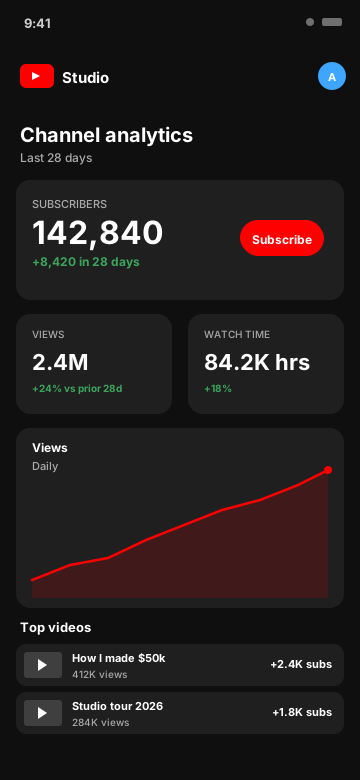
The YouTube Studio dark UI with the iconic red play button (#FF0000), subscriber hero card with red Subscribe pill, views and watch-time tiles, daily views line chart with area fill, and the top videos list with thumbnail tiles.
- YouTube Studio dark UI
- Red Subscribe button + play icon
- Subscriber count hero card
- Views and watch-time tiles
- Daily views line chart with peak dot
- Top videos list with thumbnails
Every YouTube Metric, Editable
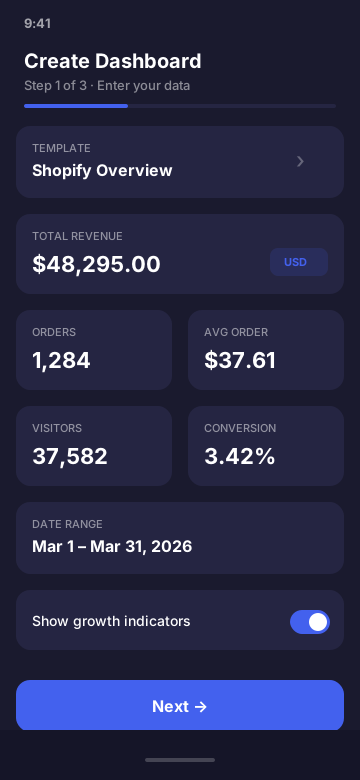
Set subscriber count, 28-day subs gained, total views, watch-time hours, top video titles, view counts, and subs-gained per video. Presets cover everything from a brand-new channel hitting 1K subs to a 10M-sub creator.
Built for Creators and Growth Coaches
Use it in milestone-reveal videos, growth case studies, course modules on title optimization, agency pitches, and Twitter analytics posts. No need to expose private channel data.
- Sub milestone reveal videos
- Growth case studies
- Title and thumbnail course modules
- Creator agency pitches
- Year-in-review channel content
YouTube Studio Mockup FAQ
What does the YouTube Studio dashboard mockup look like?
It mirrors the YouTube Studio mobile app: dark UI with the red play button (#FF0000), subscriber hero card with a Subscribe pill, views and watch-time metric cards, daily views line chart with area fill, and a top videos list with thumbnail tiles.
What YouTube Studio metrics can I customize?
Subscriber count, 28-day subs gained, total views, watch-time hours, top videos with thumbnail, view count, and subscriber attribution. The daily views chart is fully editable.
Who uses YouTube Studio mockups?
YouTubers making "I hit 100K subscribers" content, growth coaches teaching channel strategy, content agencies showing case studies, and creators on Twitter sharing analytics screenshots. Mockups let you show growth without exposing private channel data.
Is it legal to mock up YouTube Studio?
Yes. The output is labeled simulated and the app is not affiliated with YouTube or Google. Use it for design, education, and content - not to misrepresent verified channel performance for fraud or in violation of YouTube's terms.
Can I show specific video titles in the top videos list?
Yes. You set the title, view count, and subs-gained value for each top video, plus a thumbnail. Useful for retrospective "best videos of the year" content or course modules about title optimization.
Does this connect to my real YouTube channel?
No. CustomDashboards never touches the YouTube Data API and makes zero network requests. Everything is entered manually and rendered on-device.
Ready to Build Your YouTube Studio Mockup?
Download CustomDashboards - free to use, private, and your first YouTube Studio dashboard takes under 30 seconds.